Mobile Game GUI Pack 07: A Complete UI Kit for Game Developers
Getting a mobile game from a prototype to a polished product involves more than just solid mechanics and engaging gameplay loops. One of the most time-consuming hurdles developers face is the User Interface. If you are tired of wrestling with inconsistent pixels or struggling to find assets that fit your game's vibe, it is time to look at a cohesive solution. Mobile Game GUI Pack 07 is designed specifically to bridge the gap between a functional build and a visually appealing user experience. It offers a distinct aesthetic that balances playful energy with professional clarity, making it a versatile asset for a wide range of 2D projects.
Defining the Visual Character
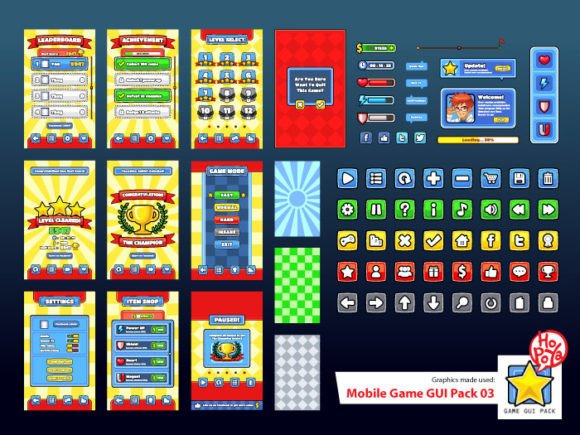
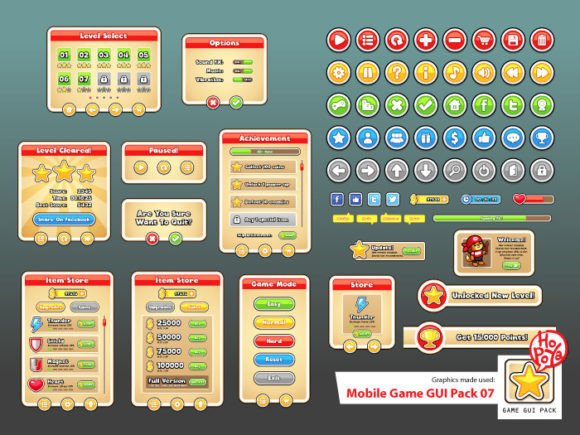
Unlike generic interface templates that feel sterile or overly corporate, this pack leans into a friendly, approachable personality. The visual style relies on smooth curves and bold outlines, creating a look that feels familiar yet distinct. It avoids the "flat design" trap by incorporating subtle gradients and depth, giving the buttons and windows a tactile quality that invites the user to tap and interact.
The personality of Mobile Game GUI Pack 07 is confident but not aggressive. It uses a rounded aesthetic that softens the digital barrier between the player and the game world. This style is particularly effective for casual games, puzzle apps, educational software, and indie RPGs where you want the interface to feel like a natural extension of the game environment rather than an overlay. The visual hierarchy is clear; primary actions stand out, while secondary information recedes gracefully, ensuring the player never feels lost or overwhelmed by on-screen clutter.
Practicality Meets Flexibility: What is Included?
As a creative professional, you know that raw assets are only as good as their flexibility. This GUI pack is built for customization. You are not just getting static images; you are getting a toolkit. The package includes Vector AICS and EPS10 files, which means you have infinite scalability. Whether you are targeting older low-resolution devices or high-definition tablets, these vectors remain crisp and clean.
For those who prefer a drag-and-drop workflow, the Transparent PNG files allow for immediate implementation in engines like Unity, Godot, or Construct. The true utility, however, lies in the modularity. The pack provides 40+ customizable buttons paired with 5 different colors. This allows you to create a consistent color language—perhaps red for danger or deletion, green for confirmation, and blue for navigation—without needing to redraw assets from scratch. Additionally, the customizable windows and game elements mean you can resize panels to fit varying amounts of text or inventory slots, a crucial feature for games that evolve during development.
Typography and Brand Consistency
A GUI is only as good as the text that labels it. Poor font choices can ruin the immersion of a beautiful interface. Recognizing this, the pack includes specific typeface recommendations to ensure visual harmony. The suggested fonts, Cloudy With a Chance of Love and Comic Neue Angular, play a pivotal role in the overall design strategy.
Cloudy With a Chance of Love brings a whimsical, handwritten touch that works perfectly for titles, splash screens, or dialogue boxes in story-driven games. It adds a human element that feels personal and inviting. On the other hand, Comic Neue Angular is a sans serif font that offers excellent readability for smaller UI elements like item descriptions, stats, and menu options. It retains a playful vibe similar to the display font but cleans up the legibility issues often associated with comic-style typefaces. Using these together creates a font pairing that is both functional and stylistically aligned, reinforcing your game's brand identity from the moment the app opens.
Strategic Application and Project Fit
When evaluating if Mobile Game GUI Pack 07 is right for your project, consider the emotional tone you wish to set. Because the style is friendly and colorful, it is an excellent fit for:
- Casual Puzzle Games: The rounded buttons provide a satisfying "tap" feel.
- Children’s Educational Apps: The bright colors and clear hierarchy help young users navigate menus independently.
- Indie RPGs and Adventure Games: The customizable windows allow for complex inventory systems without looking cluttered.
- Interactive Marketing Campaigns: If you are building a gamified ad experience, these assets provide a professional look quickly.
However, this aesthetic might not be the best fit for hyper-realistic shooters or gritty noir-themed strategy games. In those cases, the rounded, friendly nature of the GUI might conflict with the game's atmosphere. Always test the assets within your environment. Import a few buttons into your game engine and view them against your background art. Does the contrast work? Does the color palette clash? The availability of multiple color variants within the pack makes this testing phase much easier, allowing you to A/B test different UI looks without hiring a graphic designer for every iteration.
Optimizing Workflow for Developers and Designers
For the entrepreneur or indie developer wearing multiple hats, efficiency is everything. Mobile Game GUI Pack 07 acts as a force multiplier for your workflow. Instead of spending days drawing buttons in Photoshop or Illustrator, you can focus your energy on level design, coding, or marketing strategy.
From a web design perspective, the included EPS10 and AI files are invaluable. They allow you to extract specific design elements—like a particular slider style or a unique icon shape—and repurpose them for your game’s landing page, social media graphics, or press kits. This ensures that your marketing materials match your in-game interface, creating a seamless brand experience for potential players.
Furthermore, the clarity of the PNG files ensures that your UI looks sharp on social media screenshots. When you post a "screenshot Saturday" on Twitter or Instagram, the crisp edges of the buttons and the legibility of the text will signal to potential players that your project is polished and professional. In a crowded marketplace, these visual cues of quality are often what drive a user to click "Download."
Final Thoughts on Implementation
When you integrate Mobile Game GUI Pack 07, think beyond the immediate need for a button. Think about the user journey. Use the window elements to frame critical information, ensuring that the player's eye is guided naturally from the "Start" button to the high-score table. Use the color variations to teach the player the game's language intuitively.
This resource is more than just a collection of images; it is a foundation for your game's visual communication. By leveraging the included vectors and typography recommendations, you save valuable development time while elevating the production value of your final product. Whether you are a hobbyist crafting your first app or a seasoned developer streamlining your pipeline, having a reliable, customizable GUI pack in your library is a strategic advantage.