Mobile Game GUI Pack 03: Essential UI Assets for 2D Games
A Practical Toolkit for Game Developers and Designers
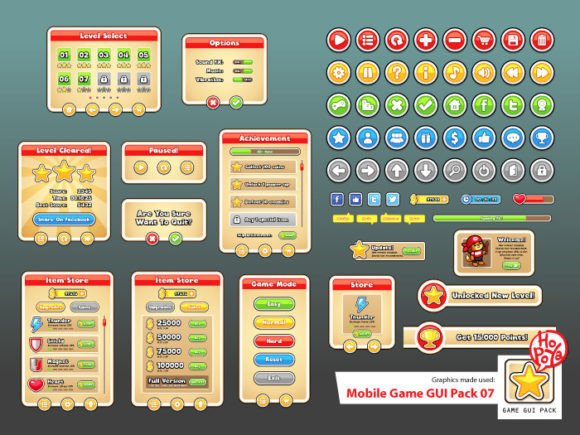
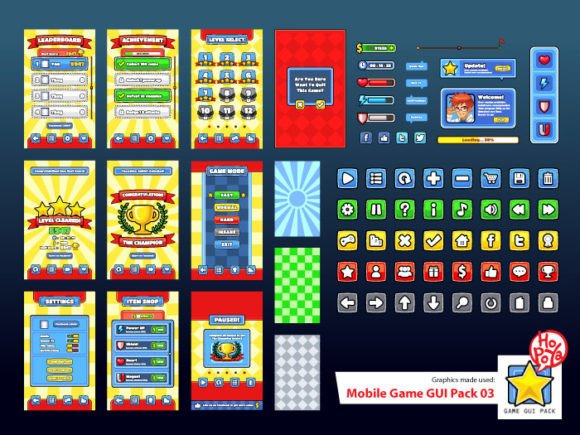
When you're building a 2D mobile game, the graphical user interface often becomes a bottleneck. You need buttons, windows, menus, and overlays that look polished but also function smoothly across different screen sizes. Mobile Game GUI Pack 03 addresses this challenge directly with a collection of over 40 customizable buttons, window frames, and game elements designed for quick integration.
What makes this pack stand out isn't just the volume of assets. Each button comes in five distinct color variations, giving you flexibility without requiring extensive recoloring work. The windows and game elements follow consistent visual language, so your interface feels cohesive rather than assembled from mismatched parts. For indie developers working under tight deadlines, this consistency matters more than most people realize.
The personality of this GUI kit leans toward clean, modern game design. It avoids overly ornate or cartoonish styling, instead offering a balanced aesthetic that works across genres. Whether you're building a puzzle game, a strategy title, or a casual arcade experience, the visual tone adapts without looking generic. That adaptability is harder to achieve than it sounds.
Vector Files and Typography That Actually Work
One aspect worth highlighting is the file format variety. The pack includes Adobe Illustrator (AI) and EPS10 vector files alongside transparent PNGs. Vector formats mean you can scale elements infinitely without quality loss, which is particularly useful when targeting multiple device resolutions. The transparent PNGs save time during implementation, especially if your development workflow doesn't involve vector editing software.
Typography choices in game interfaces deserve more attention than they typically receive. This pack uses two typefaces: Titan One and Boris Black Bloxx. Titan One functions as a bold display font with strong geometric characteristics. It commands attention without sacrificing legibility, making it suitable for buttons, headers, and in-game notifications. Boris Black Bloxx complements it with a heavier, more condensed presence that works well for scores, timers, and secondary interface elements.
These font selections reflect practical thinking about game typography. Display fonts in games need to remain readable at small sizes while maintaining personality. Titan One achieves this balance effectively. Its rounded terminals and consistent stroke weight prevent visual clutter, even when rendered at the compressed sizes typical of mobile interfaces. Boris Black Bloxx provides contrast without creating visual tension, which helps establish hierarchy within your interface layout.
Real-World Applications Beyond Gaming
While the pack targets mobile game development specifically, its applications extend into broader creative territory. Marketing professionals creating promotional materials for gaming brands can extract visual elements for social media graphics and web design assets. The button styles translate naturally into call-to-action elements for landing pages targeting gaming audiences.
Publishers and content creators working in the gaming space benefit from having consistent brand identity elements. If you run a gaming blog, YouTube channel, or podcast, these GUI elements can become part of your visual language. Using the same button styles and color palette across thumbnails, banners, and overlays creates recognition that strengthens your brand perception over time.
For entrepreneurs developing gaming-related products or services, the included assets offer starting points for packaging design and editorial layouts. The clean aesthetic works particularly well for app store screenshots, promotional flyers, and presentation materials. Small business owners in the gaming accessories space might find the color palettes useful for maintaining visual consistency across marketing channels.
Practical Considerations for Implementation
Evaluating whether this GUI pack fits your project requires honest assessment of your visual goals. If your game targets a casual audience with approachable, friendly aesthetics, these assets align well. The button shapes and color options support intuitive navigation without overwhelming players. For darker, more atmospheric game designs, you might need to adjust the color values significantly, though the vector formats make this manageable.
Font pairing within your broader project deserves testing beyond what the pack provides. While Titan One and Boris Black Bloxx handle interface text effectively, your game might need additional typefaces for narrative text, dialogue, or menu descriptions. Testing how these display fonts interact with serif or sans serif body text prevents visual disconnect between your interface and content layers.
Licensing matters for commercial projects. Before integrating these assets into products you plan to sell, verify the specific usage terms included with your purchase. Most GUI packs designed for game development allow commercial use, but confirming this prevents complications later. Document your license details as part of your project files for reference during publishing or distribution.
Getting the Most from Your Design Assets
The real value of a GUI pack like this emerges through thoughtful implementation rather than simply dragging elements onto your canvas. Consider how button states (normal, pressed, disabled) interact with your game's feedback systems. The five color variations per button give you options for indicating status changes, which improves usability without requiring custom work.
Window and game elements deserve particular attention during integration. Test how these components perform at different screen densities and aspect ratios. The vector source files make adjustment straightforward, but planning your responsive behavior early prevents frustrating revisions later. Pay attention to padding, margins, and touch target sizes, especially for smaller mobile screens where precision matters.
Mobile Game GUI Pack 03 represents a practical investment for developers who want professional results without dedicating weeks to interface design. The combination of customizable buttons, consistent window elements, quality typography, and flexible file formats addresses the core needs of 2D mobile game development. Whether you're a hobbyist shipping your first game or a small studio maintaining visual consistency across multiple titles, these design assets provide a solid foundation worth building upon.